
Inventory
Take control of your products and inventory.
Organise your product catalogue, manage variants and pricing, track barcodes and other product details, and keep stock levels accurate across your business.
How it works
How inventory works.
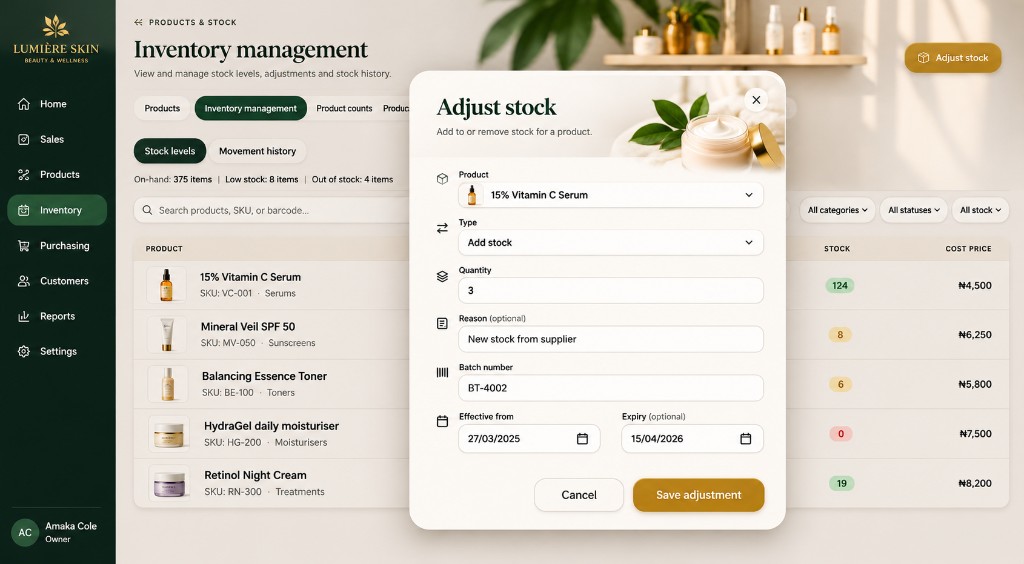
Organise products into individual variants, such as different sizes, with each variant having its own price, barcode, SKU and stock quantity. Vendriz keeps stock records up to date as sales are completed, new stock is received, adjustments are made and stock counts are approved.
Product and variant management
Organise your products and create variants for options such as size. Each variant can have its own selling price, barcode, SKU and stock quantity.
Stock visibility
Check how much stock you have at each branch, monitor reorder levels and review stock movement history.
Product pricing
Record both the selling price and cost price of your products. Access to cost information is restricted to staff with the appropriate permissions.
Batch and expiry details
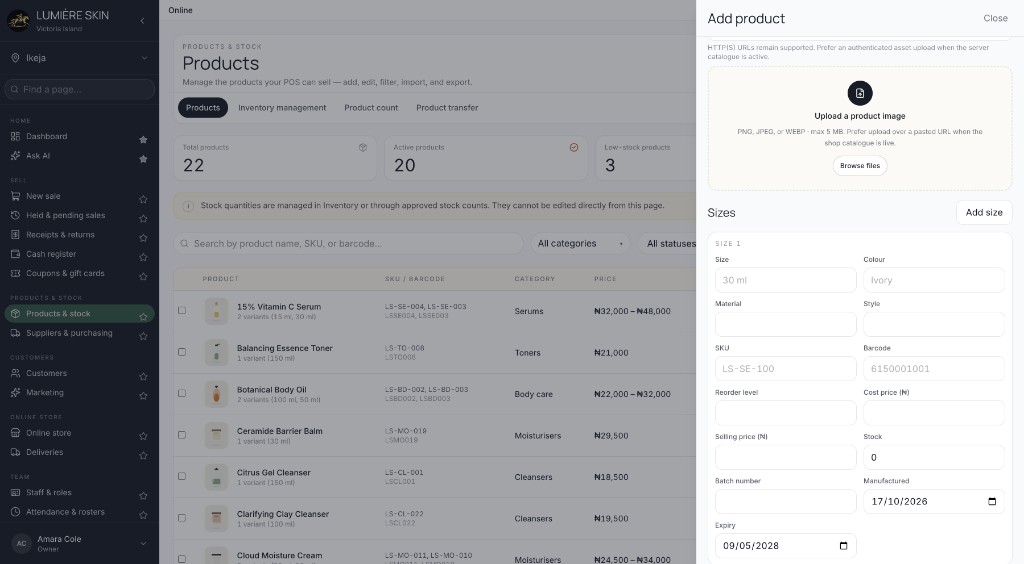
Record batch numbers, manufacturing dates and expiry dates on product variants where these details are relevant.
Product catalogue
One place for every product you sell. Keep your products organised in one catalogue, with the details you need to manage and sell them.
- Product details: Add a product name, description, selling price and category.
- Product images: Add images to help customers recognise products in your catalogue and online storefront.
- Product variants: Create different versions of the same product, such as different sizes, with each variant managed separately.
Product pricing
Keep your selling prices and product costs organised, with the right level of access for your team.
- Selling and cost prices: Record both the selling price and the cost price for each product variant.
- Branch-specific pricing: Set different selling prices for a product at individual branches where needed.
- Protected cost information: Only staff with the appropriate access can view product cost prices.
Stock visibility
Know how much stock you have at each branch and understand how it changes.
- Stock levels: See the available stock, reserved quantities and reorder levels for each product at a branch.
- Automatic stock updates: Stock changes when a sale is completed, new stock is received, an adjustment is recorded or a stock count is approved.
- Stock movement history: Review the recorded movements of each product variant to understand how its stock has changed.
Product variants
Manage every version of a product separately. Create different variants of the same product, such as different sizes, with each variant having its own details.
- Unique identifiers: Give each variant its own SKU and barcode to make it easier to identify and find.
- Separate pricing: Set a selling price for each variant, independently of other versions of the same product.
- Variant details: Record supported product options, such as size, for each variant.
Stock tracking
Keep important batch and expiry details on record. For products that require additional tracking information, you can record the following.
- Batch numbers: Record the batch associated with a product variant.
- Manufacturing dates: Keep a record of when a product was manufactured.
- Expiry dates: Record product expiry dates for reference.
- These details help you maintain product records. Vendriz does not currently provide automatic expiry alerts or automatically prioritise older batches when selling stock.
Inventory and your online store
Manage your products from one shared catalogue. Keep your in-store and online product information connected.
- Shared product records: Products published on your Vendriz online store use the same product catalogue, pricing and stock records as your POS.
- No external channel synchronisation: Sales and inventory from external marketplaces or ecommerce services are not automatically synchronised with Vendriz.
Why it helps
Keep your products, pricing and stock connected.
One shared catalogue
Manage your products in one place and use the same product records across your POS, reports and Vendriz online store.
More reliable stock records
Keep branch stock quantities up to date as sales are completed, deliveries are received, adjustments are recorded and stock counts are approved.
Protected cost information
Restrict access to product cost prices so only authorised staff can view them.
Clear stock history
Review recorded stock movements to understand how your inventory has changed over time.
In practice
Setting up a product, step by step.
Step 1
Create the product
Enter the product name, description and category.
Step 2
Add product variants
Create the versions you sell, such as different sizes.
Step 3
Assign product identifiers
Give each variant its own SKU and barcode.
Step 4
Set your prices
Enter the selling price and, where your role allows, the cost price for each variant.
Step 5
Record opening stock
Enter the starting stock quantity for each variant at the relevant branch.
Step 6
Track stock movements
Monitor inventory as sales are completed, deliveries are received, adjustments are recorded and stock counts are approved.
Connected, not separate
Your inventory works alongside the rest of Vendriz.
POS
When a sale is completed, Vendriz automatically reduces the stock of the product variant sold.
Learn moreMulti-Branch Management
Track stock separately at each branch while managing all your products from one shared catalogue.
Learn moreStock Transfers and Counts
Move stock between branches, count physical inventory and update stock records through the appropriate workflows.
Learn morePurchasing and Suppliers
When you receive a purchase order, the accepted quantities are added to the same inventory records used by your branches and POS.
Learn moreOnline Store
Products published on your Vendriz online store use the same product prices and stock records as your POS.
Learn more
Who it's for
A catalogue that grows with your business.
01
Supermarkets and mini-marts
Organise large product catalogues and keep track of fast-moving stock.
02
Fashion retailers
Manage different product sizes and variants, each with its own price and stock quantity.
03
Electronics retailers
Organise products with individual SKUs and barcodes for easier identification and checkout.
04
Beauty and cosmetics businesses
Keep product details organised, including batch numbers and expiry dates where needed.
05
Growing retail businesses
Manage products and monitor stock across branches from one shared catalogue.
FAQs
Frequently asked questions
Straight answers about Inventory.
Yes. A product can have one or more variants, such as size, and each variant keeps its own price, barcode and stock quantity.
Only when a sale is completed, a delivery is received, a manual adjustment is recorded, or a stock count is approved. Submitting a count on its own does not move stock.
A batch number, manufacturing date and expiry date can be recorded on a variant. This is operational record-keeping, not an automated expiry-alert or allocation system.
Cost price is shown only to the roles your shop's permissions allow; other roles see the selling price only.
Related features
Explore more of Vendriz.
See how these features work together to help you manage your retail business.
Stock Transfers and Counts
Move stock between branches, count inventory and keep stock records accurate.
Learn morePurchasing and Suppliers
Manage suppliers, organise purchase orders and record incoming stock.
Learn more
Keep one catalogue your whole business can trust.
Manage products, variants, pricing and stock in one place, with inventory connected to your everyday sales across every branch.