
Reports
Understand your business from the records you already keep.
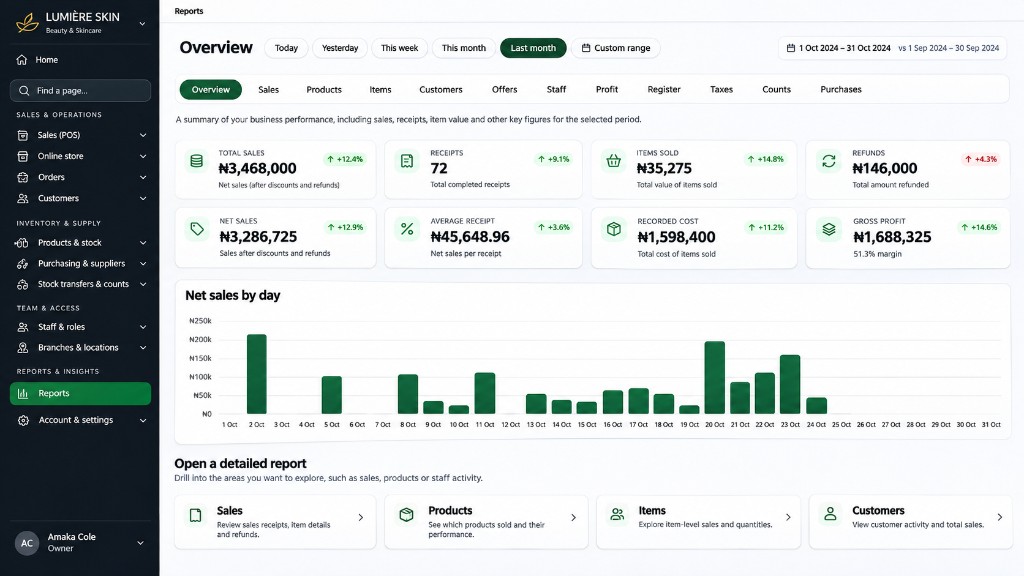
Review sales, staff, branch and stock activity in one place. Vendriz turns completed sales and recorded inventory movements into reports that help you understand what happened across your business.
How it works
Your business activity, brought into focus.
Choose the dates you want to review, from a single day to a custom range. Explore sales, branch and staff activity, then review stock movements using the inventory records already maintained in Vendriz.
Sales reports
Review completed sales, totals, discounts and refunds for the dates you select.
Branch reporting
Understand sales and stock activity across your business locations.
Staff reporting
Review sales and checkout activity attributed to the staff members who recorded them.
Stock and count reporting
Follow inventory movements and stock-count differences over time.
Sales reports
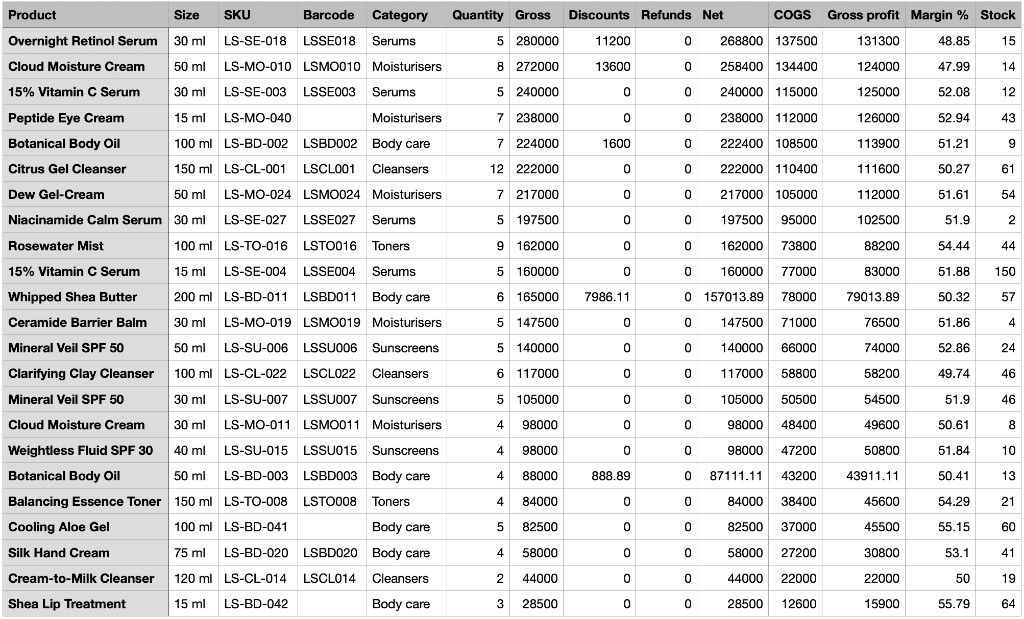
See what sold and how much your business made. Review sales activity across the periods that matter to you, using completed receipts as the basis for your reports.
- Choose your dates: Select a single day or custom date range to review sales activity.
- Built from completed receipts: Sales reports use completed receipts and account for discounts and refunds.
- Clear operational visibility: Understand your sales activity through records already maintained in Vendriz. Sales and stock reports provide operational visibility. They are not a full accounting system.
Branch reporting
Understand activity across your locations. See how sales and stock activity are distributed across your business locations.
- By location: Review sales and stock activity for individual branches.
- Across your business: Understand how activity is distributed across the locations you operate.
Staff sales reporting
See sales activity by the people who serve your customers. Review completed sales and checkout activity attributed to individual staff members.
- Attributed sales: Understand the sales activity recorded by each staff member using completed receipts.
- Clear accountability: Connect sales activity to the staff member who was signed in or acting in the POS when the sale was recorded.
Inventory and stock reporting
Follow stock movements and count differences over time. Review how inventory changes across your business and understand the movements behind your stock figures.
- Stock movements: Review recorded sales, returns, received deliveries, transfers and approved stock counts for your chosen period.
- Count differences: Review stock-count differences separately from everyday sales activity.
Exports
Take your business records with you. Export supported datasets as CSV files when you need to review, share or work with your records outside Vendriz.
- Sales exports: Export sales records for further analysis.
- Stock movement exports: Download recorded inventory movement data.
- Audit log exports: Export audit records for your own review and record-keeping.
- Product exports: Download your product records as a CSV file.
- Permission-aware access: Export access follows the same permissions required to view each dataset. Supported CSV exports cover sales, stock movements, the audit log, and products.
Why it helps
Keep a clearer view of everyday performance.
Sales by date range
Review completed sales activity over the periods that matter to your business.
Branch and staff breakdowns
Understand location performance and team activity using the same underlying records.
Stock alongside sales
Review inventory movements and count differences alongside sales activity.
CSV when you need it
Export sales, stock movements, audit logs and product records for use outside Vendriz.
In practice
Reviewing your business, step by step.
Step 1
Choose your dates
Select the period you want to review.
Step 2
Open sales reports
Start with an overview of completed sales activity for that period.
Step 3
Review branch activity
If you operate multiple locations, examine sales and stock activity by branch.
Step 4
Review staff activity
Understand sales and checkout activity attributed to individual team members.
Step 5
Check stock movements
Review inventory movements and stock-count differences alongside your sales activity.
Step 6
Export your records
Download the supported datasets as CSV files when you need them elsewhere.
Connected, not separate
Your reports work alongside the rest of Vendriz.
Inventory
Stock reporting draws from the same inventory records used to manage your product catalogue.
Learn moreMulti-Branch Management
Review sales and stock activity across the locations your business operates.
Learn moreStock Transfers and Counts
Review recorded transfers, stock movements and approved count differences.
Learn moreStaff Management
Staff sales reporting connects activity to the relevant staff accounts and access records.
Learn more
Who it's for
For businesses that want a clearer view of their operations.
01
Growing retailers
Move beyond scattered notebooks and spreadsheets with reports built from completed sales and recorded stock movements.
02
Multi-branch businesses
Understand sales and stock activity across your different locations.
03
Shop owners and managers
Review everyday sales totals and staff checkout activity.
04
Organised operators
Export sales, stock movements, audit logs and product records when you need to work with them outside Vendriz.
FAQs
Frequently asked questions
Straight answers about Reports.
Sales reports provide an overview of completed sales activity for your selected date range. They are built from completed receipts and account for discounts and refunds.
Yes. Vendriz supports branch reporting and staff sales reporting, allowing you to review sales and stock activity by location and sales activity attributed to individual staff members.
You can review recorded stock movements, including sales, returns, received deliveries, transfers and approved stock counts. Stock-count differences can also be reviewed separately from sales activity.
Vendriz supports CSV exports for sales, stock movements, the audit log, and products. Access to each export follows the permissions required to view that dataset.
Related features
Explore more of Vendriz.
See how sales, inventory, branches and staff management contribute to the records you review in Vendriz.
Multi-Branch Management
Review activity across locations from one connected business account.
Learn moreStaff Management
Give your team the access they need while keeping sales activity attributed to the right staff member.
Learn more
See what is happening across your business.
Review sales, branch, staff and stock activity, and export your records when you need them, with Vendriz.