
Stock transfers and counts
Know where your stock is. Keep every movement accountable.
Manage stock adjustments, branch transfers and physical counts through controlled workflows. Vendriz keeps inventory movements recorded, so you can track what changes, where it changes and why.
How it works
Every stock movement has a process.
Move stock between branches, record physical counts and make adjustments with a reason. Vendriz keeps these activities connected to your branch inventory records.
Branch transfers
Send stock from one branch to another and record its movement through the transfer process.
Physical stock counts
Record the quantities actually on your shelves and review discrepancies before approved differences change your stock figures.
Movement history
Review recorded stock movements from sales, returns, received deliveries, transfers and approved counts.
Count approvals
A submitted count does not automatically change stock. An authorised role must review and approve the resulting difference.
Stock adjustments
Record stock changes with a reason. Sometimes stock figures need to be corrected following an operational discovery. Vendriz lets you record a manual adjustment against a product variant at a specific branch.
- Adjust stock directly against the selected branch's inventory.
- Record the reason for each adjustment.
- Keep adjustments in the stock movement history for that variant.
Stock transfers
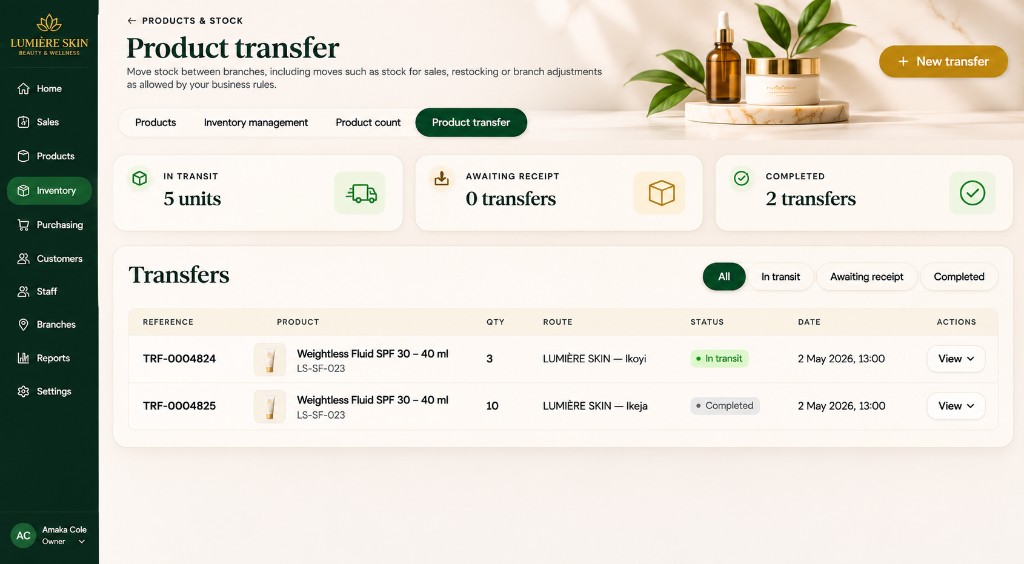
Move stock between branches with control. Transfer products between your business locations while keeping the movement recorded.
- Create a transfer from the working branch to a destination branch.
- The sending branch cannot send more stock than it has on hand.
- Track transfers through their supported stages: sent, received, resolved where a discrepancy is found, or cancelled while eligible.
- Keep transfer activity connected to the relevant branch stock records.
Physical stock counts
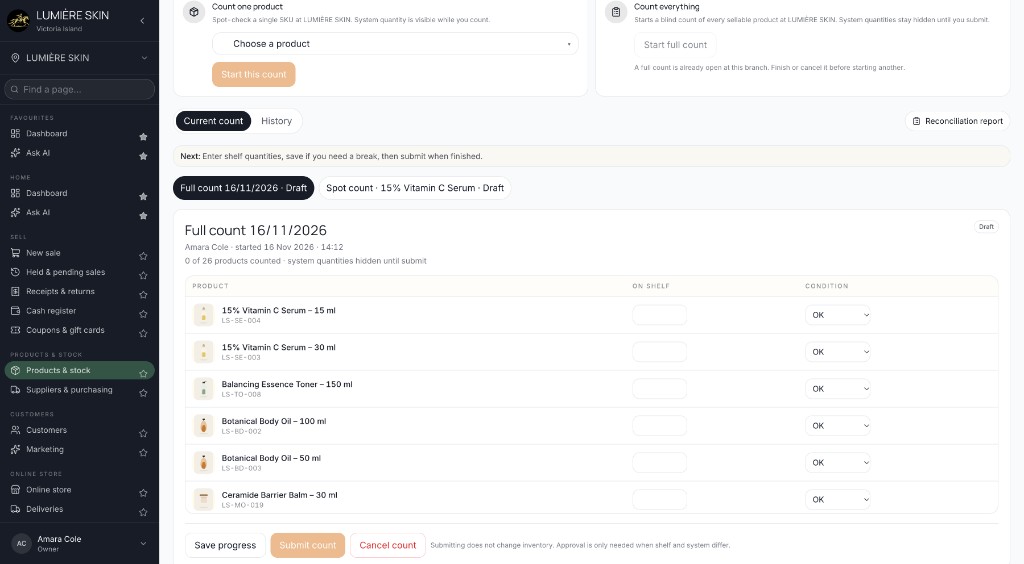
Check what is actually on your shelves. Record physical quantities and compare them with the stock figures in Vendriz. Review differences before approved changes are applied.
- Start a stock count session for a branch.
- Record the counted quantity for each product.
- Submit the count for review.
- An authorised role reviews and approves the resulting difference before stock changes.
- Submitting a count is not the same as approving it. Your stock figures remain unchanged until the resulting difference is approved.
Inventory accuracy
Identify stock discrepancies before they become bigger problems. Regular counts and controlled transfers give your team a structured way to identify differences between recorded quantities and physical stock.
- Vendriz helps you review and correct discrepancies through recorded workflows.
- It does not eliminate stock loss, counting errors or operational mistakes.
Auditability
Keep a record of what changed and why. Stock management is about more than knowing your current quantities. You also need to understand how those figures changed.
- Review recorded movements from sales, returns, received deliveries, transfers and approved counts.
- Trace manual adjustments through their recorded reasons.
- Keep stock count activity and its approval lifecycle on record, including submission, review and approval.
Why it helps
What a controlled stock process gives your business.
Controlled transfers
Prevent branches from sending more stock than they have available.
Reviewed stock counts
Keep submitted counts from changing stock figures before approval.
Recorded movements
Review the history behind stock changes instead of relying only on current quantities.
Better discrepancy management
Give your team a structured process for identifying, reviewing and correcting stock differences.
In practice
Three common stock management situations.
Situation 1
A branch needs stock from another location
Create a transfer from the sending branch, send the stock and have the destination branch receive it. The movement remains recorded against the relevant branches.
Situation 2
A physical count reveals a discrepancy
Record the actual quantities, submit the count and let an authorised role review and approve the resulting difference before stock changes.
Situation 3
An operational discovery requires an adjustment
Record the stock change directly against the affected branch and product variant, including a reason for the adjustment.
Connected, not separate
Stock transfers and counts work alongside the rest of Vendriz.
Inventory
Every transfer and approved count updates the inventory records used to manage your product catalogue and stock.
Learn moreMulti-Branch Management
Move stock between the branches your business operates while keeping each location's inventory organised.
Learn morePurchasing and Suppliers
Record incoming stock when purchase orders are received and connect those quantities to branch inventory.
Learn moreReports
Review available stock movement and count-related reporting to understand inventory activity.
Learn more
Who it's for
For businesses that move, manage or count stock.
01
Multi-branch retailers
Move products between locations while keeping stock movements accountable.
02
Supermarkets and mini-marts
Carry out physical stock counts and review differences in everyday inventory operations.
03
Fashion and electronics retailers
Verify stock quantities across products and their individual variants.
04
Growing retail businesses
Keep a recorded reason for manual stock changes and a history of inventory movements.
FAQs
Frequently asked questions
Straight answers about Stock Transfers and Counts.
No. A transfer cannot send more stock than the sending branch has on hand.
No. Submitting a count does not automatically change your stock. The resulting difference must first be reviewed and approved by an authorised role.
Yes. Vendriz records stock movements, including sales, returns, received deliveries, transfers, adjustments and approved stock counts. This helps you review how inventory quantities have changed.
Related features
Explore more of Vendriz.
See how inventory, branches, purchasing and reporting work together to support your everyday stock operations.
Keep every stock movement accountable.
Manage transfers, physical counts and adjustments with controlled workflows and recorded inventory movements across your branches.