
Staff management
Give your team the right access to do their work.
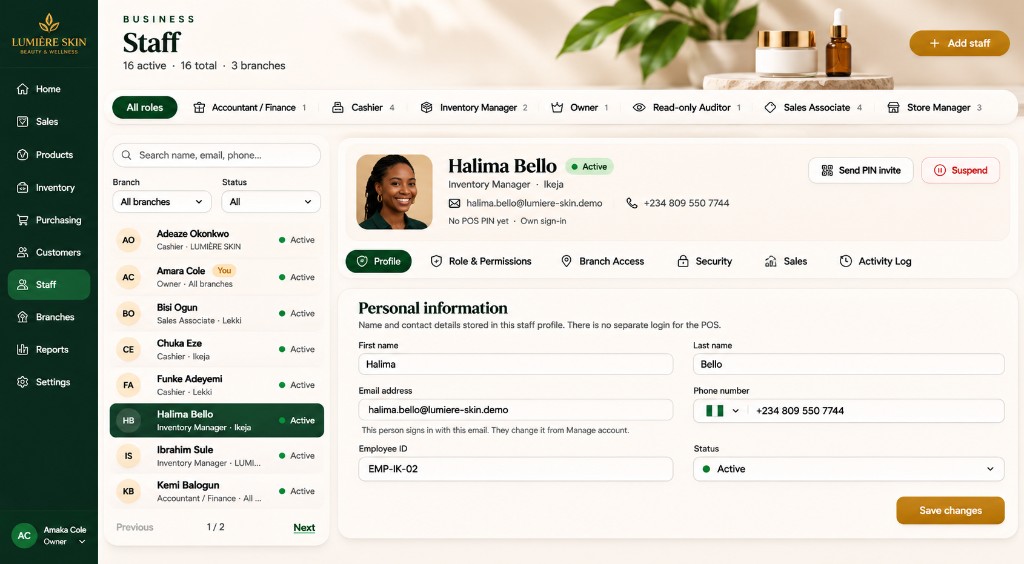
Manage staff accounts, assign roles and organise branch access from your business workspace. With Vendriz, each team member signs in with their own account and works within the permissions and locations assigned to them.
How it works
Give every team member a clear role.
Invite staff by email, assign their roles and choose the branches where they are authorised to work. Each person gets their own sign-in details and, where applicable, a private staff PIN.
Staff invitations
Invite team members by email so they can accept the invitation and set up their own access.
Roles and permissions
Assign roles that determine which pages and actions each person can access.
Branch assignments
Set a home branch and assign any additional locations where a staff member is authorised to work.
Accountability
Keep sales and other recorded actions linked to the staff member who performed them.
Staff records
Keep your team organised in one place. Maintain a clear record of the people who work in your business, including their roles and branch assignments.
- Team profiles: View each staff member’s profile, assigned role and authorised branches.
- Manage changing teams: Suspend a staff record when someone leaves and restore it later when necessary.
Staff invitations
Bring new team members on board securely. Invite people to join your business without sharing account passwords or staff PINs.
- Invite by email: Send an invitation to the email address of the person joining your team.
- They set up their own access: The invited person accepts the invitation and sets their own password and, where applicable, their staff PIN.
- Private staff PINs: Each staff member sets their own PIN. Other people, including the business owner, cannot view it.
- Single-use invitation links: Invitation links are single-use and time-limited, helping protect the account setup process.
Staff authentication
Give every team member their own sign-in. Keep staff identities separate so actions can be attributed to the right person.
- Individual accounts: Staff members sign in using their own email and password. Their accounts are separate from the Vendriz account used to create the shop.
- Staff switching: At a shared register, switching the active staff member requires that person’s own PIN. This does not give them access beyond the role permissions and branch assignments attached to their account.
Roles and permissions
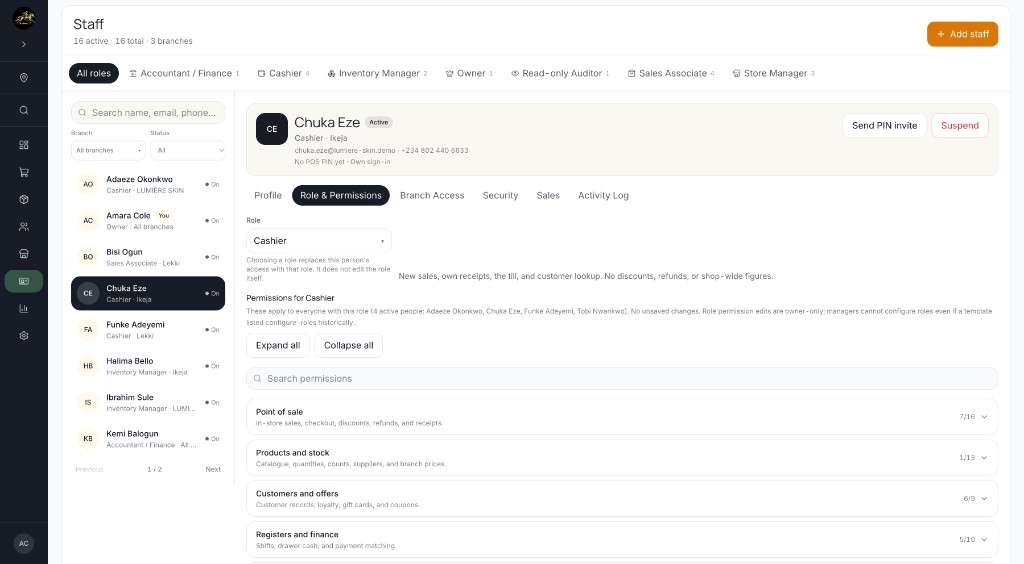
Match access to each person’s responsibilities. Give team members access to the tools they need without making every business action available to everyone.
- Ready-made roles: Start with available role templates, including Owner, Store Manager, Cashier, Inventory Manager, Sales Associate, Accountant and Read-only Auditor.
- Access by role: Permissions cover areas such as sales, inventory, purchasing, reports and settings.
- Control supported permissions: Configure the permissions available for each role so access reflects what each person is authorised to do.
Branch assignments
Give people access to the locations where they work. Organise staff access around the branches they are responsible for.
- Home and additional branches: Assign each person a home branch and any other locations where they are authorised to work.
- Location-aware access: Keep branch-related activities within the locations assigned to each staff member.
Accountability
Know who performed each recorded action. Keep everyday business activity connected to the people responsible for it.
- Attributed actions: Sales, stock changes and other recorded activities remain linked to the staff member who performed them.
- Reviewable activity: Make recorded activity available for review by the roles authorised to access it.
Why it helps
Keep team access organised and accountable.
Individual sign-in
Give every team member their own account instead of relying on shared credentials.
Role-based access
Control what owners, managers, cashiers and other team members can do.
Branch-scoped work
Keep staff access aligned with the locations where they are authorised to work.
Clear attribution
Keep recorded sales and other business actions linked to the person responsible.
In practice
Bringing a new team member onto Vendriz.
Step 1
Create the staff record
Add the person’s profile and assign the appropriate role.
Step 2
Set branch access
Choose their home branch and any additional locations where they are authorised to work.
Step 3
Send the invitation
Invite them by email so they can set their own password and, where applicable, staff PIN.
Step 4
They accept and sign in
The new team member accepts the invitation and accesses the business workspace using their own account.
Step 5
They start working
They can access the pages and perform the actions permitted by their role and branch assignments.
Step 6
Activity stays attributed
Sales and other recorded actions remain linked to the person who performed them.
Connected, not separate
Your staff access works alongside the rest of Vendriz.
Multi-Branch Management
Branch assignments determine the locations where staff members are authorised to work.
Learn more
Who it's for
For retail teams that need organised access.
01
Owner-led shops
Give cashiers, inventory managers and managers access that matches their responsibilities.
02
Multi-branch businesses
Assign team members to the locations where they are authorised to work.
03
Growing retail teams
Control access to sensitive actions, such as larger discounts and product cost prices, according to assigned permissions.
04
Accountable operators
Keep a clearer record of who performed everyday sales and stock activities.
FAQs
Frequently asked questions
Straight answers about Staff Management.
A password is used to sign in to a staff member’s individual account. A PIN is used to switch the active staff member at a shared register. Switching the active staff member does not expand access beyond that person’s assigned role and authorised branches.
Vendriz provides role templates including Owner, Store Manager, Cashier, Inventory Manager, Sales Associate, Accountant and Read-only Auditor. Available permissions determine which pages and actions each role can access.
Create their staff record, assign a role and choose their authorised branches. Then send an email invitation. They accept the invitation and set their own password and, where applicable, staff PIN.
Yes. Sales and other recorded activities are linked to the staff member who performed them. Access to review those activities depends on the permissions assigned to each role.
Related features
Explore more of Vendriz.
See how staff access connects with sales, branches and reporting across your business.
Give your team access that matches their role.
Invite staff, assign permissions and branch access, and keep everyday business activity attributed to the right people with Vendriz.