
RETAIL MANAGEMENT FOR FASHION BUSINESSES
Manage your fashion retail business with greater clarity.
Bring product management, sales, inventory, purchasing and everyday business operations together with Vendriz. Keep styles organised, track available stock and manage your retail operations from one connected workspace.

Operational challenges
Fashion retail needs more than attractive displays.
From changing collections to different product sizes and stock quantities, fashion businesses need reliable product and inventory records. Vendriz helps organise these everyday retail operations without claiming to replace specialised fashion merchandising or planning tools.
01
Keeping collections organised
Every style needs a clear product record so your team can find the right item at checkout and keep inventory organised.
02
Managing different sizes and options
A product may have several variants. Where configured, each variant can have its own price, barcode and stock quantity.
03
Knowing what is available to sell
Sales and received goods change stock quantities. Connected inventory records help you maintain visibility over what remains available.
04
Keeping checkout straightforward
Your team needs a reliable way to find products, build customer baskets, record payments and complete everyday sales.
05
Managing stock across boutiques
When you operate multiple locations, each branch needs its own stock records, with a shared product catalogue and controlled stock transfers.
06
Understanding product and sales activity
Reports built from completed receipts help you review sales activity, product results and staff sales across the dates you choose.
Platform capabilities
Retail tools for fashion businesses.
Manage the essential operations behind your fashion business, from product variants and checkout to stock control, purchasing and reporting.
Product and inventory management
Organise styles and product variants, with separate prices, barcodes and stock quantities for each configured variant.
Learn morePOS and checkout
Process everyday boutique sales using product search or barcode entry, held sales and supported cash or recorded bank-transfer payments.
Learn moreStock counts
Record physical quantities, review discrepancies and approve stock adjustments before inventory records change.
Learn moreStock transfers
Move products between boutiques through a controlled send-and-receive workflow.
Learn moreSuppliers and purchasing
Maintain supplier records, organise purchase orders and record incoming goods into inventory.
Learn moreSales and stock reports
Review completed sales, product activity, staff sales and stock movements across selected date ranges.
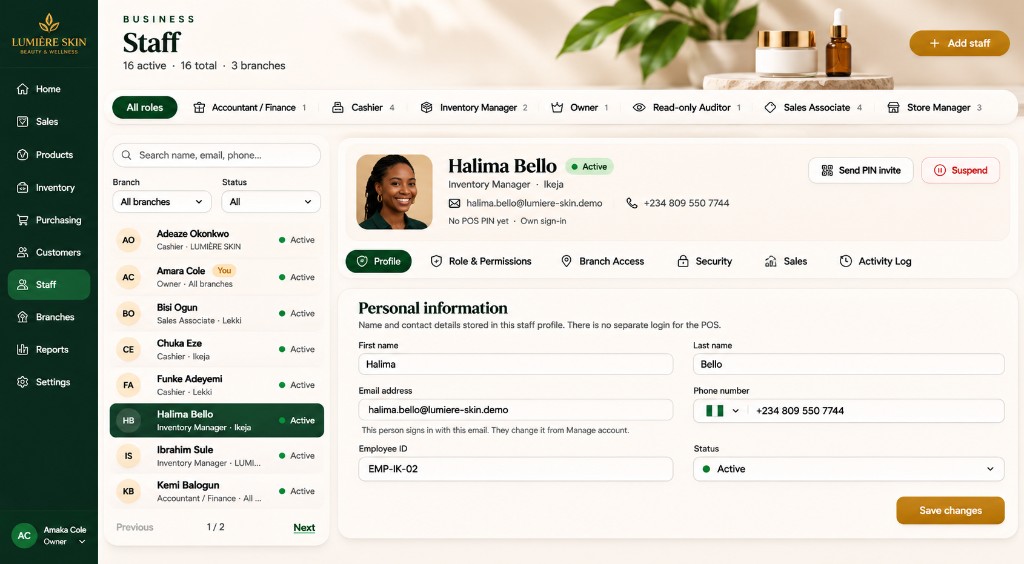
Learn moreStaff roles and permissions
Assign individual staff accounts and control which pages and actions each team member can access.
Learn moreMulti-branch management
Share one product catalogue across boutiques while maintaining separate stock quantities and sales records for each branch.
Learn more
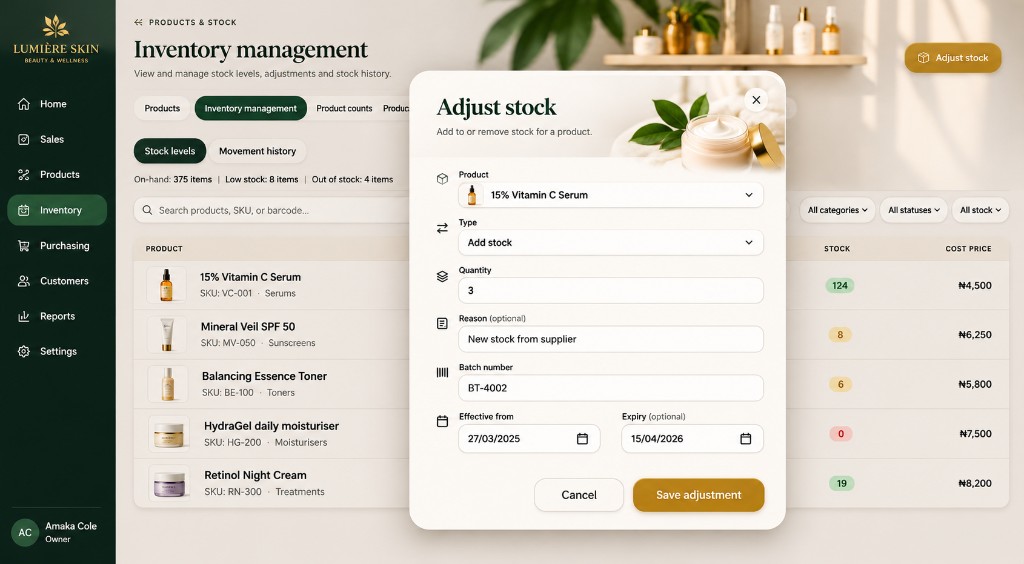
Product and inventory management
Keep every style and option organised.
Use Vendriz's product catalogue to manage the styles you sell and the variants your customers choose. Each configured variant can maintain its own prices, barcode and stock quantity.
- Create product records for the styles you sell.
- Organise supported variants such as sizes.
- Assign individual prices, barcodes and stock quantities to variants.
- Keep stock quantities connected to completed sales and received goods.
- Review inventory movements and make authorised adjustments when needed.
Vendriz provides product and variant management for retail inventory. It does not currently replace a dedicated fashion merchandising or seasonal planning system.
POS and checkout
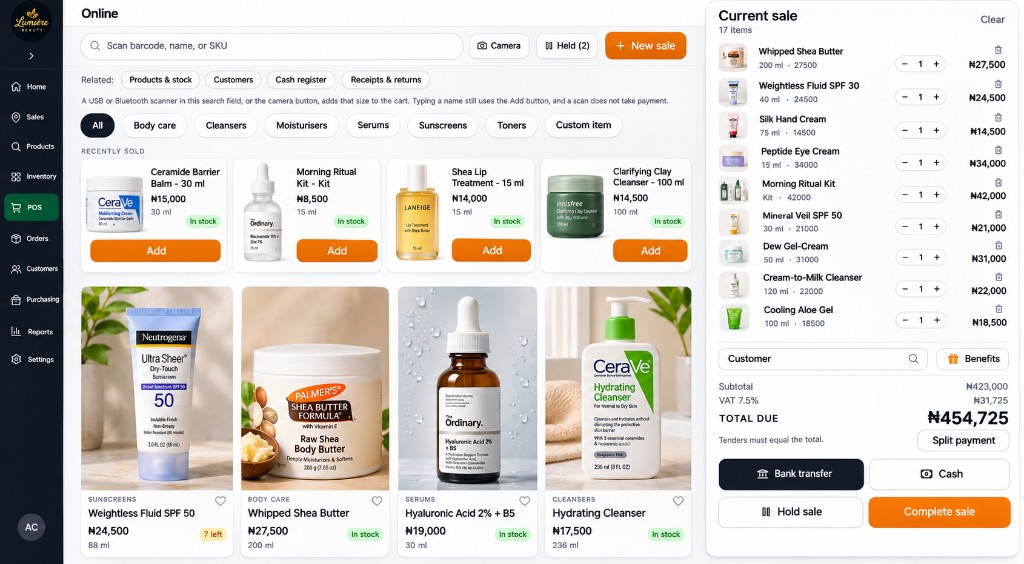
Make every boutique sale straightforward.
Give your sales team an efficient checkout experience for serving customers and recording everyday transactions.
- Find products by name, barcode or SKU.
- Add products and quantities to the current sale.
- Select the appropriate product variant.
- Hold a sale and resume it when needed.
- Record cash and bank-transfer payments.
- Generate receipts for completed sales.
Offline checkout supports cash and recorded bank-transfer sales. A recorded transfer does not confirm that funds have been received.
Stock counts and transfers
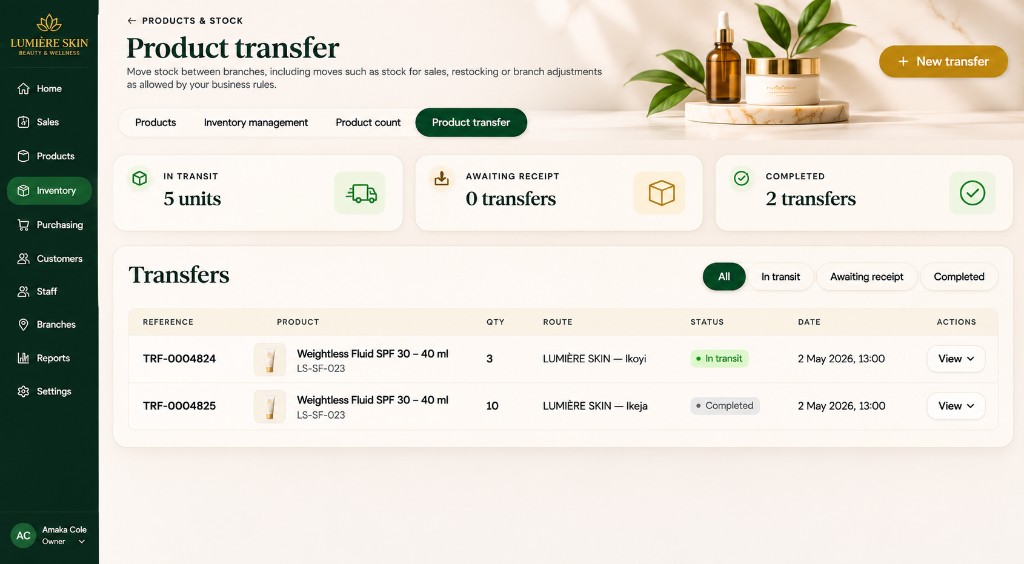
Keep stock accountable across your boutiques.
Verify physical quantities and move products between locations through controlled inventory workflows.
Physical stock counts
- Record the quantities physically available.
- Submit the count for review.
- Review discrepancies before approving adjustments.
- Update inventory only after an authorised approval.
Branch stock transfers
- Create transfers from one branch to another.
- Prevent transfers exceeding the sending branch's available stock.
- Send and receive stock through the supported transfer workflow.
- Review transfer history and recorded discrepancies.
Purchasing and suppliers
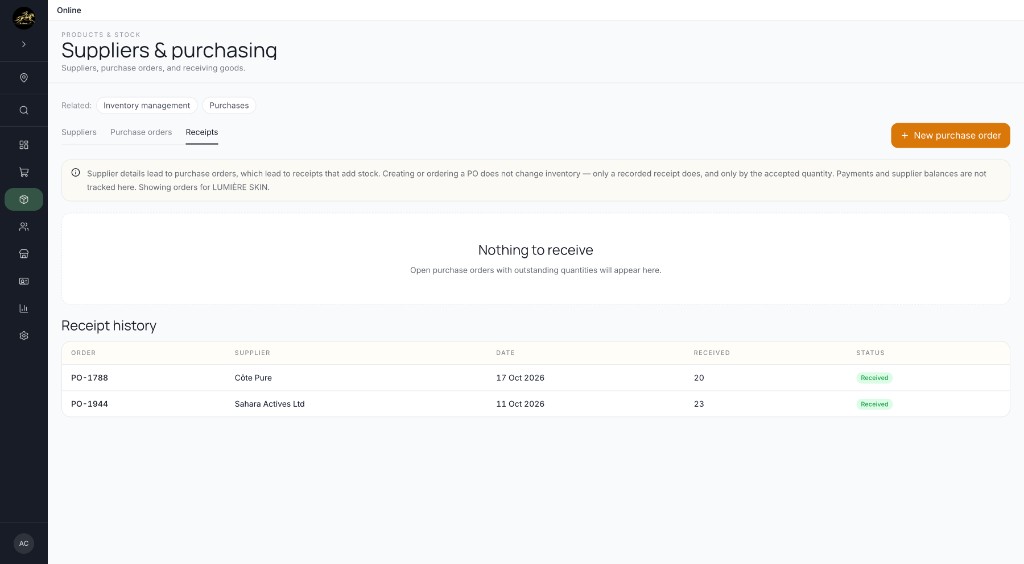
Connect supplier deliveries to your inventory.
Keep supplier records and purchasing activity organised alongside the products your business sells.
- Maintain records for the suppliers you buy from.
- Create purchase orders for products and quantities.
- Record delivered quantities against open purchase orders.
- Update branch inventory when goods are received.
- Review available purchasing activity and reports.
Reports and staff access
Understand sales activity and organise your team.
Review the activity recorded across your fashion business and give each team member access according to their responsibilities.
Business reporting
- Filter sales and stock reports by date range.
- Review product and staff sales activity from completed receipts.
- Examine recorded stock movements and count differences.
- Export supported report data as CSV files.
Staff management
- Give each team member an individual account.
- Assign roles and supported permissions.
- Control access to relevant sales, inventory and purchasing operations.
- Assign staff to the branches where they are authorised to work.
- Keep recorded sales and stock actions attributed to the responsible staff member.
FAQs
Frequently asked questions
Straight answers for fashion retailers.
Yes. You can configure product variants such as sizes. Each variant can have its own price, barcode and stock quantity. Vendriz does not currently provide a separate advanced fashion size-and-colour merchandising matrix beyond its supported product variant records.
Vendriz provides sales and stock reports based on recorded business activity. It does not currently provide specialised seasonal demand estimates or fashion collection planning.
Yes. Multiple branches can use the same product catalogue while maintaining their own stock quantities and sales records. Stock can be transferred between branches through the controlled transfer workflow.
Yes. Vendriz supports everyday retail checkout, including product search, barcode entry, product variants, held sales, receipts, cash and recorded bank-transfer payments.
Related solutions
Explore Vendriz across other retail industries.
The same connected retail capabilities can support different kinds of businesses. Explore how Vendriz helps other retailers organise their everyday operations.
Bring your fashion retail operations together.
Manage products, variants, checkout, inventory, purchasing and reports with Vendriz. Give your team the tools to keep everyday retail operations organised as your business grows.