
Purchasing and suppliers
Bring more structure to your purchasing operations.
Manage supplier records, organise purchase orders and record goods received. Vendriz connects your purchasing activities to the inventory records your branches and POS already use.
How it works
From supplier orders to stock received.
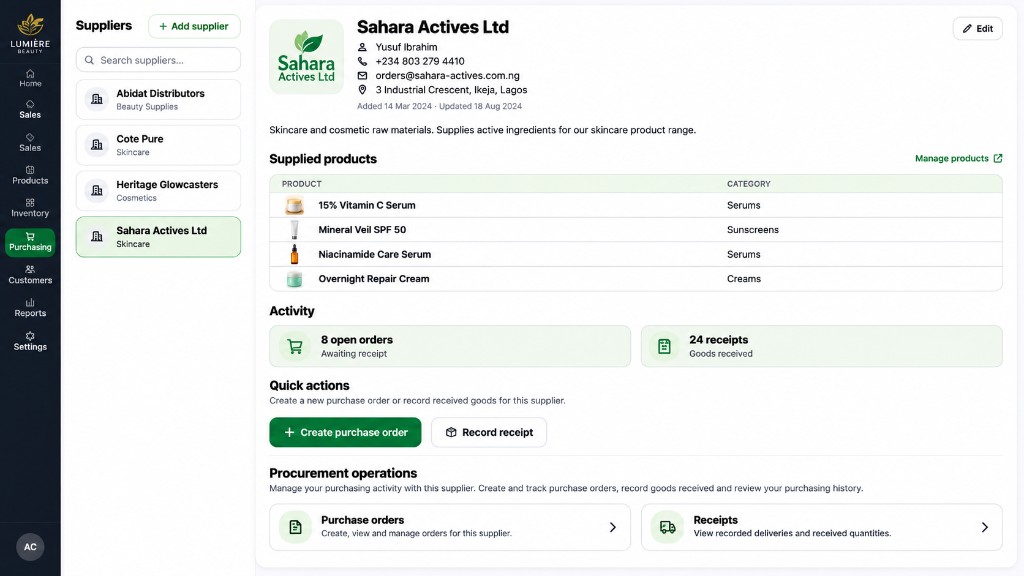
Keep track of the suppliers you buy from, create purchase orders for the products you need and record deliveries as they arrive. When goods are received, the accepted quantities update the relevant branch inventory.
Supplier records
Keep the supplier details you need for everyday purchasing and restocking organised in one place.
Purchase orders
Create orders for the products and quantities you need, then track their progress through the purchasing workflow.
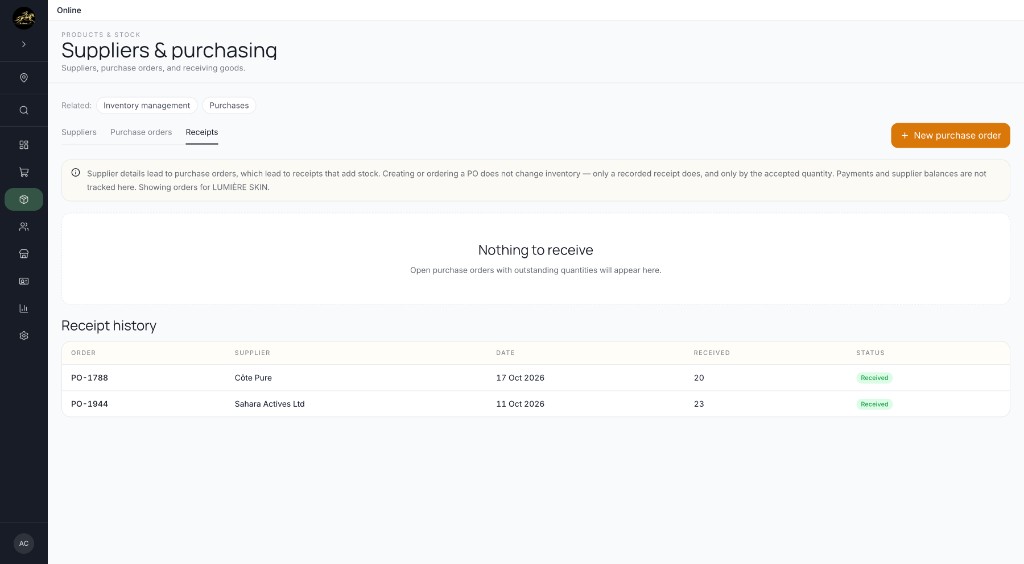
Goods received
Record delivered quantities against an open purchase order and update your branch inventory.
Purchasing reports
Review purchase orders and goods received through the purchasing reports available to your role.
Supplier records
Keep your supplier details organised. Maintain supplier records in one place so your team can easily refer to the businesses they purchase from.
- Store the supplier information supported by Vendriz.
- Keep supplier records connected to your purchasing activities.
- Find the supplier associated with a purchase order when reviewing purchasing history.
- Vendriz supplier records support everyday purchasing operations. They are not a full supplier relationship management or CRM system.
Purchase orders
Know what you are ordering and who you are ordering from. Organise restocking with purchase orders that record the supplier, products and quantities requested.
- Create an order: Raise a purchase order against the supplier you have selected.
- Add products and quantities: Include the products and quantities your business needs to restock.
- Track order progress: Keep the purchase order and its status available as it moves through the supported purchasing workflow.
Purchasing visibility
Keep purchasing activity clear and accessible. Review supplier orders and goods received according to the access permissions assigned to your role.
- Role-based access: Purchase orders and receiving records are available to the roles authorised to access them.
- Connected purchasing records: Review the relationship between what was ordered and what was recorded as received.
- Operational purchasing records: Vendriz helps you organise purchasing and receiving activities. It does not provide a supplier financial statement or accounts-payable ledger.
Receiving stock
Record what arrived. Keep inventory up to date. When a supplier delivers an order, record the quantities received against the relevant open purchase order.
- Match delivered quantities against the products on the purchase order.
- Record the quantities actually received.
- Associate the receipt with the branch or location receiving the stock.
- Update the branch inventory records with the accepted quantities.
- This connects incoming goods to the same inventory records used by your product catalogue and POS.
Why it helps
Keep restocking organised and connected.
One supplier list
Keep supplier details organised instead of relying on scattered contacts and informal records.
Clear order records
Know which products and quantities were requested from each supplier.
Inventory that stays in step
Update branch stock records when received goods are recorded.
A clearer receiving trail
Connect purchase orders to the quantities actually received.
In practice
A typical restocking cycle.
Step 1
Choose your supplier
Select the supplier you intend to purchase from.
Step 2
Create a purchase order
Start a new order associated with that supplier.
Step 3
Add products and quantities
Include the items and quantities your business needs.
Step 4
Save the order
Record the purchase order so your team can refer to it and follow its progress.
Step 5
Receive the delivery
When the goods arrive, open the relevant purchase order and record the delivery.
Step 6
Verify quantities
Check the quantities received against the products and quantities ordered.
Step 7
Update inventory
The accepted received quantities update the inventory records for the receiving branch.
Connected, not separate
Your purchasing works alongside the rest of Vendriz.
Inventory
Received quantities update the same stock records used by your product catalogue and POS.
Learn moreStock Transfers and Counts
Move received stock between branches or verify inventory quantities through physical counts.
Learn moreReports
Review purchasing activity, including supplier orders and goods received, through available purchase reports.
Learn more
Who it's for
For businesses that regularly restock from suppliers.
01
Supermarkets and mini-marts
Organise frequent restocking from multiple suppliers with clearer order and receiving records.
02
Fashion and electronics retailers
Keep product and quantity records organised when ordering stock from suppliers.
03
Beauty and cosmetics businesses
Manage supplier records and organise incoming products alongside everyday inventory.
04
Growing retail businesses
Replace informal ordering processes with a more organised way to record purchase orders and received goods.
FAQs
Frequently asked questions
Straight answers about Purchasing and Suppliers.
Yes. Vendriz lets you store the supplier details you need for everyday purchasing, so your team can refer to them when creating purchase orders and reviewing purchasing history.
Create a purchase order against a supplier, add the products and quantities you need, and keep the order available as it moves through the purchasing workflow.
Yes. When received quantities are recorded and accepted against an open purchase order, those quantities update the inventory records for the receiving branch.
Yes. Purchase orders and goods received are available through purchasing reports for the roles authorised to access them, so you can review the relationship between what was ordered and what arrived.
Related features
Explore more of Vendriz.
See how purchasing connects with inventory, stock transfers and reporting across your business.
Stock Transfers and Counts
Move stock between branches, count inventory and keep stock records accountable.
Learn more
Connect purchasing to your inventory workflow.
Keep supplier records, purchase orders and goods received organised in one place with Vendriz.