
Multi-branch management
Manage every branch with greater control.
Run your business locations from one place. Share a product catalogue across your branches while keeping stock, sales, pricing and staff access organised at each location.
How it works
One business, every branch connected.
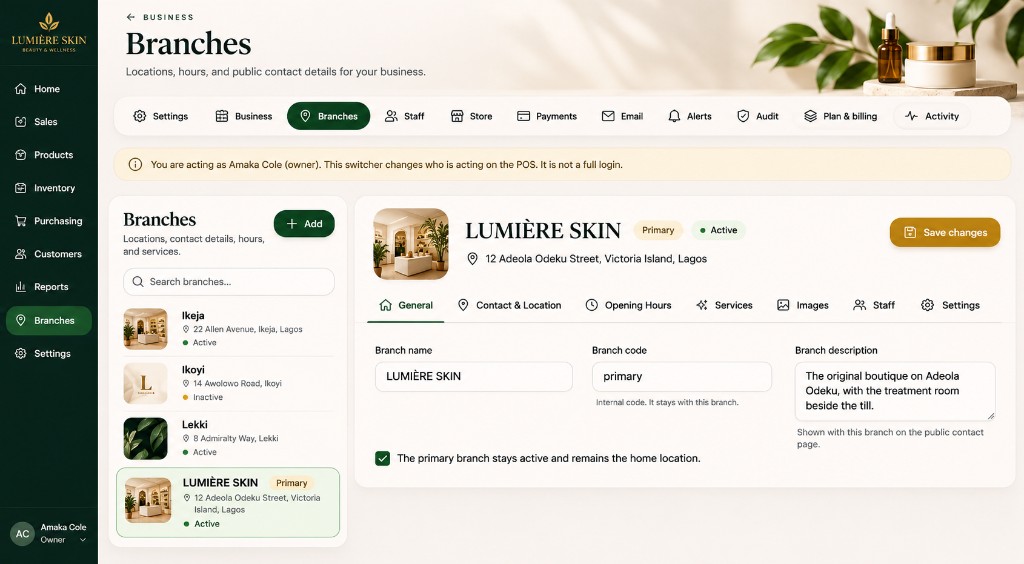
Your branches share one product catalogue, but each location maintains its own stock quantities and sales records. You can assign staff to the branches they work in and control which locations they can access.
Shared branch records
Manage all your locations using one product catalogue, with separate stock quantities and sales records for each branch.
Stock at each location
See how much stock each branch has, review stock adjustments and check product availability without mixing quantities between locations.
Staff and branch access
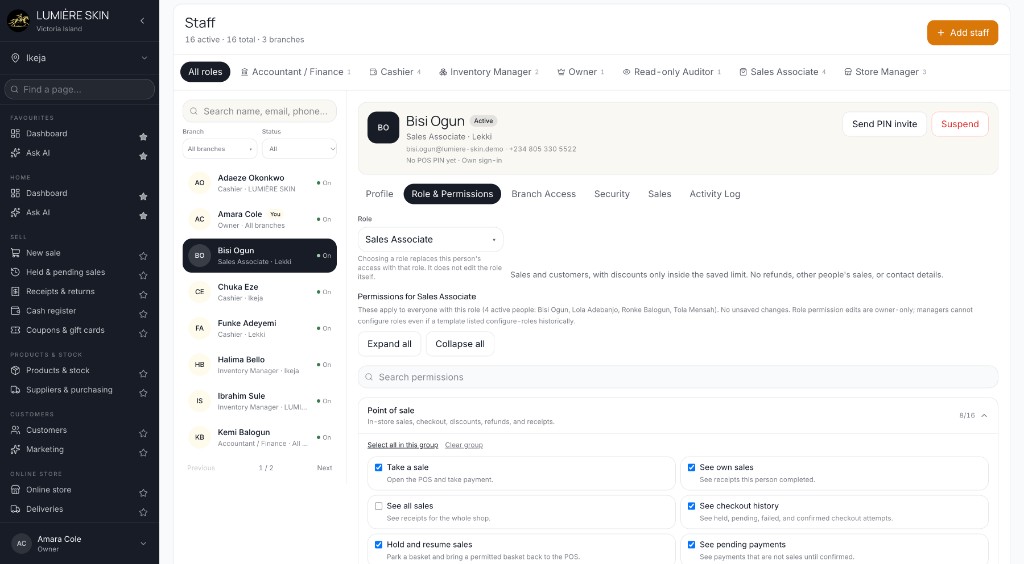
Assign team members to the branches where they work. Each person can have a home branch, with access restricted to their assigned locations.
Branch performance
Review sales and stock activity by location and compare branches using the reports available in Vendriz.
One business, several locations.
Manage every branch from one account without maintaining separate product catalogues for each location.
- One shared catalogue: Add a product once and make it available across your branches.
- Separate branch records: Each location maintains its own stock quantities and sales history.
- Connected operations: Move between branches while keeping their individual stock and sales records organised.
Branch-level inventory
Know what each branch has in stock. Keep track of inventory at every location without losing sight of the bigger picture.
- Stock by location: View stock on hand, reserved quantities and reorder levels separately for each branch.
- Independent stock updates: Changes to one branch's stock do not automatically change another branch's quantities.
- Better stock visibility: Check what each location has available when planning transfers or replenishing inventory.
Branch pricing
Set different prices at different locations. Keep one shared product catalogue while allowing individual branches to sell selected products at different prices.
- Branch-specific prices: Set a different selling price for a product variant at a particular branch where needed.
- One shared catalogue: Manage products centrally without creating separate product records for every location.
- Flexible local pricing: Adjust prices for individual branches without changing the selling price at other locations.
- Branch pricing is based on individual location overrides. It does not currently provide scheduled pricing or timed promotional price lists.
Stock transfers between branches
Move stock where your business needs it. Transfer products between locations while keeping each branch's inventory records accountable.
- Controlled transfers: Send stock from one branch to another and record its receipt at the destination.
- Available stock limits: A branch cannot transfer more stock than it currently has available.
- Transfer tracking: Follow the transfer process and review its status through Stock Transfers and Counts.
Branch sales reporting
Understand how each branch is performing. Review business activity by location and compare branches using Vendriz's available reports.
- Individual branch reports: Review sales and stock activity for a selected location.
- Compare locations: See how your branches perform alongside one another in supported reports.
- Clear operational records: Understand sales and inventory activity across your business. These reports are operational reports, not consolidated financial statements.
Branch staff access
Give every team member access to the right locations. Manage which branches your staff can work in and keep access under control as your team grows.
- Assigned locations: Assign staff to one or more branches and designate their home branch.
- Controlled access: Staff can only carry out branch-specific actions in locations they are authorised to access.
- Server-enforced restrictions: Vendriz checks branch access when actions are performed, not just when pages or buttons are displayed.
- This helps prevent staff from accessing or changing information outside the branches they are authorised to work in.
Why it helps
Keep every location organised from one place.
One shared catalogue
Manage your products in one place and make them available across all your branches.
Accountable stock
Keep separate stock quantities and sales records for each location, without mixing branch activity.
Controlled staff access
Give team members access only to the branches where they are authorised to work.
Better branch visibility
Review sales and stock activity across your locations to understand how each branch is performing.
In practice
Setting up a new branch, step by step.
Step 1
Create your branch
Add the new location and enter its business details.
Step 2
Access your product catalogue
Your existing product catalogue is available to the new branch, so you don't have to create your products again.
Step 3
Record opening stock
Enter the starting stock quantities for the products available at that location.
Step 4
Assign your staff
Choose which team members can work at the new branch and set their home branch where applicable.
Step 5
Start selling
Process customer purchases through the POS, with each completed sale recorded against the branch where it took place.
Step 6
Transfer stock when needed
Move products between locations through Vendriz's stock transfer workflow.
Step 7
Review branch performance
Use Reports to review sales and stock activity across your business locations.
Connected, not separate
Your branches work alongside the rest of Vendriz.
Inventory
Manage one shared product catalogue while keeping stock quantities separate at each branch.
Learn moreStock Transfers and Counts
Move products between locations and verify stock quantities through physical counts.
Learn moreReports
Review sales and stock activity to understand how your different locations are performing.
Learn morePOS
Process sales at each location, with every completed transaction recorded against the branch where it took place.
Learn more
Who it's for
Built for businesses growing across multiple locations.
01
Retailers with two or more shops
Keep stock and sales records separate while managing all your products from one shared catalogue.
02
Growing retail chains
Add new business locations without having to rebuild your product catalogue for each branch.
03
Multi-outlet beauty and cosmetics businesses
Manage product availability, branch-specific pricing and staff access across your locations.
04
Businesses with a main shop and smaller outlets
Manage a primary location alongside secondary branches, with separate stock and sales records for each.
FAQs
Frequently asked questions
Straight answers about Multi-Branch Management.
Only the branches they are assigned to. Branch access is enforced on the server for every request, not only hidden in the interface.
A stock transfer sends stock out of the working branch and receives it at the destination; the sending branch cannot send more than it has on hand. See Stock Transfers and Counts.
Yes, reports can be reviewed across branches as well as per branch, within the sales and stock reporting Vendriz supports.
Related features
Explore more of Vendriz.
Discover how inventory, stock transfers, staff management and reporting help you manage every branch.
Stock Transfers and Counts
Move products between branches and verify stock quantities through physical counts.
Learn moreStaff Management
Assign team members to branches and control which locations they can access.
Learn more
Bring every branch together with Vendriz.
Manage your products from one shared catalogue, keep stock and sales organised by location, and give your team access to the branches where they work.