
Skip to content
Product
  • POSCheckout for everyday sales
  • InventoryProducts and stock on hand
  • Multi-Branch ManagementStock and sales by location
  • Stock Transfers and CountsMove and verify stock
  • Purchasing and SuppliersSupplier records and orders
  • ReportsSales and stock reporting
  • Staff ManagementRoles and permissions
  • Online StoreA storefront for your catalogue
  • Supermarkets
  • Mini-marts
  • Fashion Retail
  • Electronics Retail
  • Beauty and Cosmetics
  • ResourcesArticles and guides for retail operations
  • BlogEducational retail articles
  • GuidesPractical process walkthroughs
  • FAQsCommon questions, answered
  • How it worksHow Vendriz connects retail operations
Pricing
Log inGet started
  1. Home
  2. /Resources
  3. /Blog
  4. /What to track in sales reports

Business reporting

What to track in sales reports

Understand the sales information that helps business owners make informed decisions, including sales totals, product performance, location activity and trends.
Published 1 April 2026
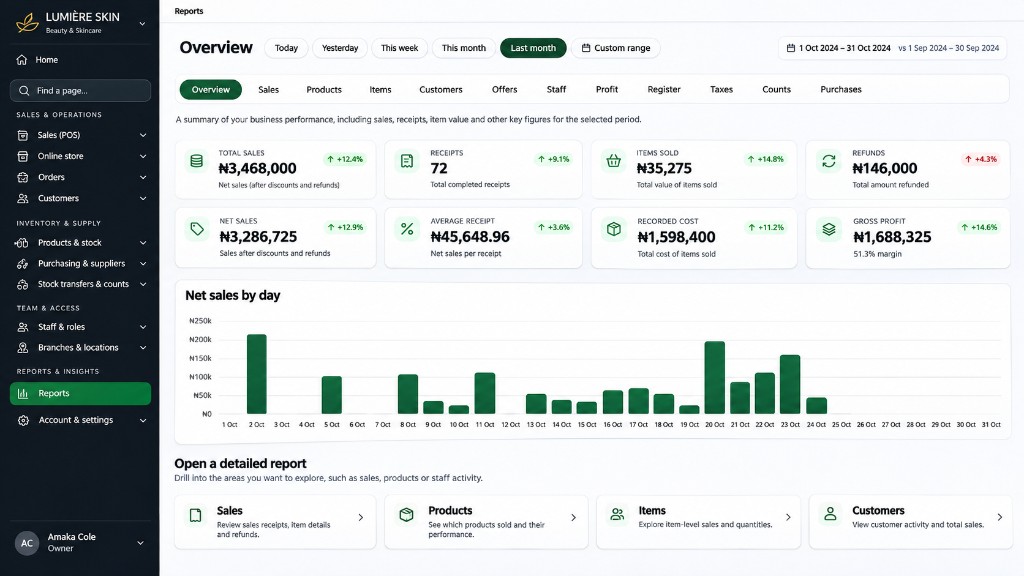
Reports overview with date filters and sales totals used in educational report reading.

Article

Sales reports should answer operational questions, not decorate a dashboard. Start with a short list of views you will actually open every week.

Core totals

  • Gross sales for the day, week, and month
  • Transaction count and average basket size
  • Returns and voids as a share of sales
  • Payment method mix where it affects banking

Product and category mix

Top sellers tell you what to protect on the shelf. Persistent non-movers tell you what to stop reordering. Category views help when the catalogue is large.

Location comparison

Multi-branch owners need the same metrics broken down by location. A strong total can hide a weak branch.

Product note

Vendriz includes sales and inventory reporting surfaces in the product. Use them to review verified in-app figures — we do not invent industry benchmarks here.

Trends over single snapshots

One good Saturday does not define the month. Compare like-for-like periods and note promotions or stockouts that distort the picture.

On this page

  1. 1Core totals
  2. 2Product and category mix
  3. 3Location comparison
  4. 4Trends over single snapshots

Keep reading

Related resources

  • Purchasing and suppliers · 25 Mar 2026

    How retailers can improve purchasing decisions

    Learn how sales history, available stock, supplier lead times and branch requirements can help you make more informed purchasing decisions.

    Read article
  • POS and retail operations · 1 Mar 2026

    What is a POS system and how does it work?

    Understand what a point-of-sale system does, the information it records, how it connects with inventory and what to look for when choosing a modern POS solution for your business.

    Read article
  • POS and retail operations · 2 Mar 2026

    Getting started with a POS workflow

    A practical walkthrough of setting up a retail POS workflow, from organising your product catalogue and stock to configuring staff access and processing your first sales.

    Read guide

Next step

Ready to run retail operations in one place?

Explore Vendriz, review pricing by enquiry, or contact the team with your questions.

Get startedContact us

Point of sale, inventory, branches, purchasing, reports and staff access — together in Vendriz.

Log inGet started

Product

  • Product overview
  • POS
  • Inventory
  • Multi-Branch
  • Stock Transfers and Counts
  • Purchasing
  • Reports
  • Staff Management
  • Online Store

Solutions

  • Supermarkets
  • Mini-marts
  • Fashion Retail
  • Electronics Retail
  • Beauty and Cosmetics

Company

  • Pricing
  • About
  • Contact

Resources

  • Resources
  • Blog
  • Guides
  • FAQs
  • How it works
  • Getting help

© 2026 Vendriz

  • Legal Information
  • Privacy Policy
  • Terms of Service
  • Customer Terms
  • Cookie Policy
  • Acceptable Use
  • Data Processing Agreement
  • Company information