
POS and retail operations
Getting started with a POS workflow
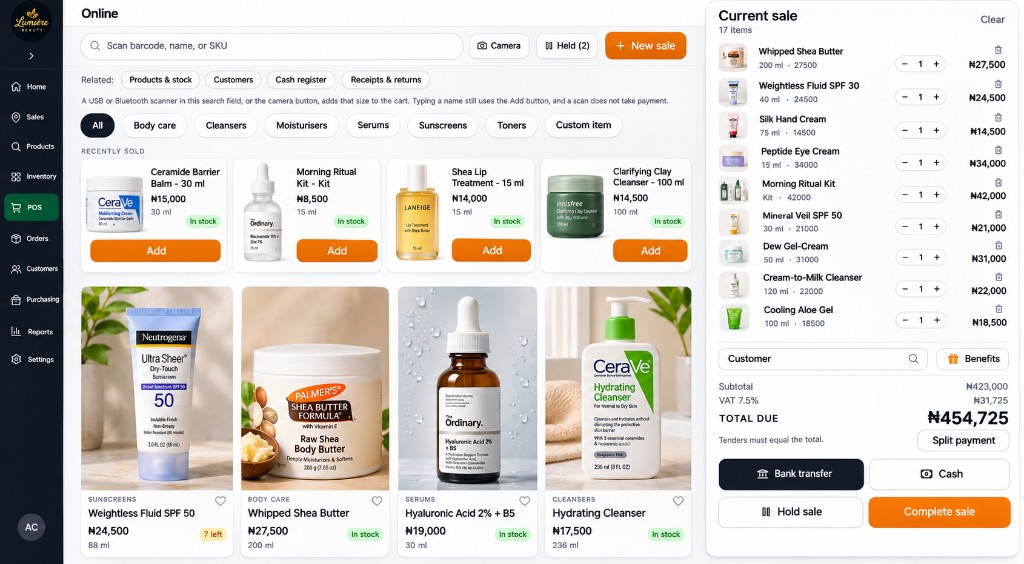
A practical walkthrough of setting up a retail POS workflow, from organising your product catalogue and stock to configuring staff access and processing your first sales.
Guide
Prerequisites
- Business and branch details ready
- A first list of products with prices and barcodes where available
- Owner or admin access to the POS
Step 1: Set up the product catalogue
Add the products you sell most first. Include clear names, SKUs or barcodes, and selling prices. Add variants explicitly when size or colour changes what is on the shelf.
Step 2: Seed opening stock
Record opening on-hand quantities for each location. Prefer a counted opening balance over a guess — early accuracy saves later cleanup.
Step 3: Give staff the right access
Cashiers need checkout. Managers may need voids, reports, or inventory. Avoid sharing a single owner login across the floor.
Step 4: Run first sales and review
Process a few real or controlled sales, confirm stock moved, and open a sales report for the period. Fix catalogue issues before the busy period.
Common mistakes
- Skipping barcodes and relying on slow search during peak hours
- Opening with zero stock while goods are already on the shelf
- Giving every staff member full admin access
- Never reviewing the first day’s sales and voids
Summary
Catalogue first, seed honest stock, assign roles, then prove the loop with real checkouts and a report check.
Keep reading
Related reading
POS and retail operations · 1 Mar 2026
What is a POS system and how does it work?
Understand what a point-of-sale system does, the information it records, how it connects with inventory and what to look for when choosing a modern POS solution for your business.
Read articleStore management · 5 Apr 2026
How to choose a POS for a small retail business
A practical checklist for evaluating a POS system, including checkout reliability, inventory management, branch support, staff access, reporting and customer support.
Read articleInventory management · 12 Mar 2026
Running a stock count
How to plan, count, and post variances so on-hand stock matches the shelf.
Read guidePurchasing and suppliers · 22 Mar 2026
Receiving a purchase into inventory
Record supplier deliveries against purchases so on-hand stock and costs stay trustworthy.
Read guide
Next step
Put the workflow into practice
Get started with Vendriz, or contact us if you want help matching the product to your shops.