
Purchasing and suppliers
Receiving a purchase into inventory
Record supplier deliveries against purchases so on-hand stock and costs stay trustworthy.
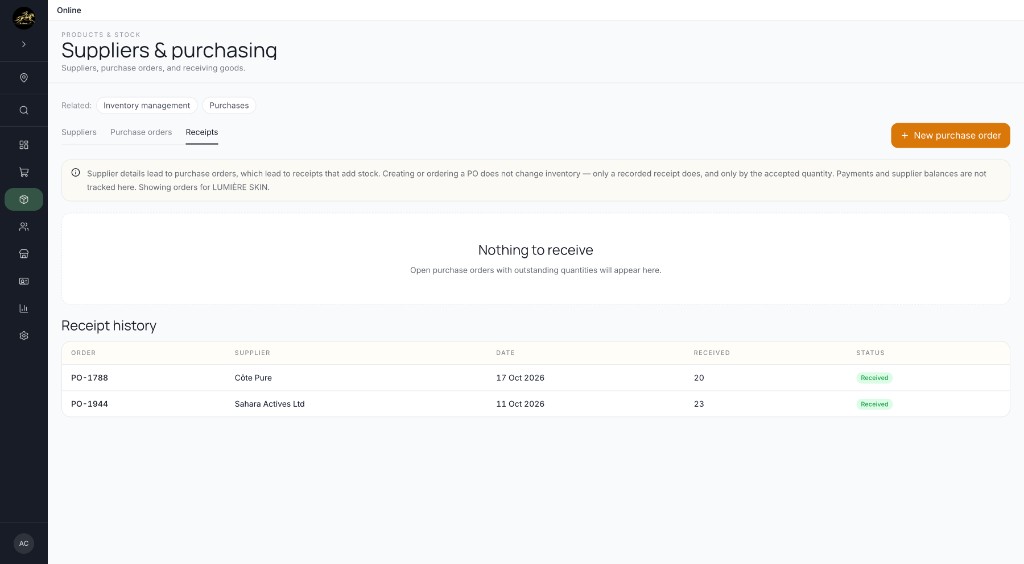
Guide
Prerequisites
- Products exist in the catalogue
- A purchase or delivery note to receive against
- Clear destination branch for the goods
Step 1: Match the delivery
Compare the physical delivery to the purchase or supplier note. Note shortages, extras, and damaged goods before posting.
Step 2: Receive into the correct branch
Post received quantities to the location that actually took the goods. Receiving into the wrong branch creates ghost stock elsewhere.
Step 3: Put away and spot-check
Shelf the goods, then spot-check a few SKUs on-hand versus the shelf. Fix barcode or quantity issues while the delivery is still fresh.
Common mistakes
- Selling from unreceived stock
- Receiving into the wrong branch
- Ignoring short deliveries
- Leaving damaged goods in on-hand without adjustment
Summary
Match the note, receive into the right branch, put away, and spot-check so purchases become honest on-hand stock.
Keep reading
Related reading
Purchasing and suppliers · 25 Mar 2026
How retailers can improve purchasing decisions
Learn how sales history, available stock, supplier lead times and branch requirements can help you make more informed purchasing decisions.
Read articleInventory management · 5 Mar 2026
How to manage inventory for a retail business
A practical framework for keeping retail stock accurate: catalogue structure, on-hand counts, receiving, and routine checks.
Read articlePOS and retail operations · 2 Mar 2026
Getting started with a POS workflow
A practical walkthrough of setting up a retail POS workflow, from organising your product catalogue and stock to configuring staff access and processing your first sales.
Read guideInventory management · 12 Mar 2026
Running a stock count
How to plan, count, and post variances so on-hand stock matches the shelf.
Read guide
Next step
Put the workflow into practice
Get started with Vendriz, or contact us if you want help matching the product to your shops.