
POS and retail operations
What is a POS system and how does it work?
Understand what a point-of-sale system does, the information it records, how it connects with inventory and what to look for when choosing a modern POS solution for your business.
Article
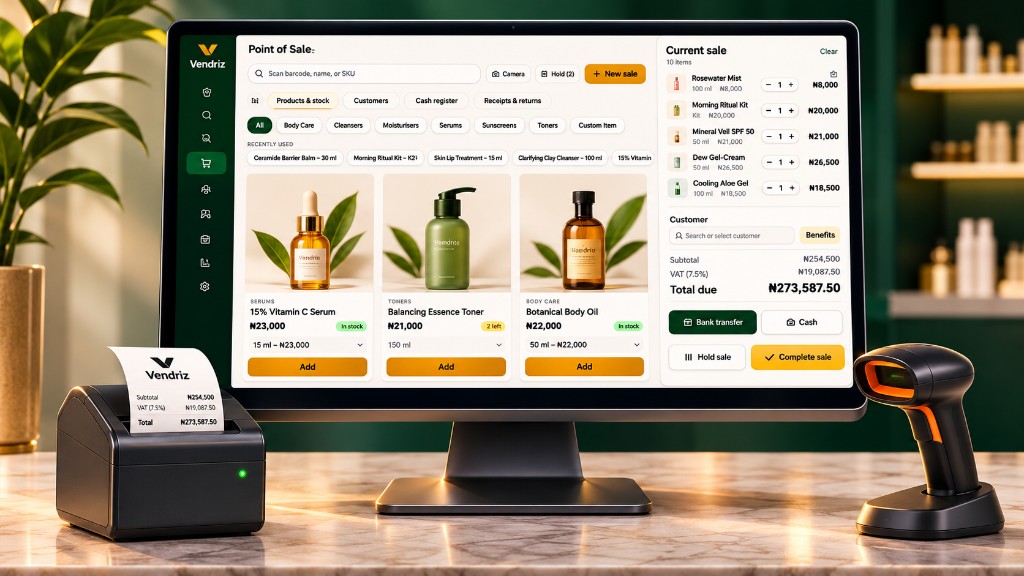
A point of sale (POS) system is the software and hardware retailers use to complete a sale. At its simplest, it records what was sold, at what price, and how the customer paid. In a modern shop it also updates stock, supports returns, and feeds reports the owner can review later.
What happens at checkout
When a cashier rings up a basket, the POS looks up each product, applies the current price, calculates tax where configured, and records the payment method. The sale should leave a clear trail: line items, totals, and who processed the transaction.
- Product lookup by barcode, SKU, or search
- Price, discounts, and tax calculated consistently
- Payment recorded (cash, card, transfer, or mixed)
- Stock reduced for the selling location when inventory is tracked
How POS connects to inventory
Selling without inventory updates creates blind spots. A connected POS reduces on-hand quantities when items sell and can flag low stock so purchasing can react. Multi-branch shops need the same idea per location: selling in one branch should not silently change another branch’s on-hand count.
Beyond checkout
Retailers usually also need returns and voids with a reason trail, staff permissions so not everyone can change prices or open reports, and day-end visibility into what sold. Online catalogue sync is optional and only relevant if you sell through a storefront connected to the same catalogue.
What to expect from a modern POS
- Reliable product and price lookup at the counter
- Inventory that moves with sales, transfers, and receipts
- Clear sales history for disputes and audits
- Reports that match how you actually run the shop
If you are comparing tools, start with checkout reliability and inventory accuracy before chasing extras. A POS that cannot keep stock honest will cost more in overselling and manual fixes than any feature checklist can save.
Keep reading
Related resources
Store management · 5 Apr 2026
How to choose a POS for a small retail business
A practical checklist for evaluating a POS system, including checkout reliability, inventory management, branch support, staff access, reporting and customer support.
Read articleBusiness reporting · 1 Apr 2026
What to track in sales reports
Understand the sales information that helps business owners make informed decisions, including sales totals, product performance, location activity and trends.
Read articlePOS and retail operations · 2 Mar 2026
Getting started with a POS workflow
A practical walkthrough of setting up a retail POS workflow, from organising your product catalogue and stock to configuring staff access and processing your first sales.
Read guide
Next step
Ready to run retail operations in one place?
Explore Vendriz, review pricing by enquiry, or contact the team with your questions.