
Multi-branch management
Moving stock between branches
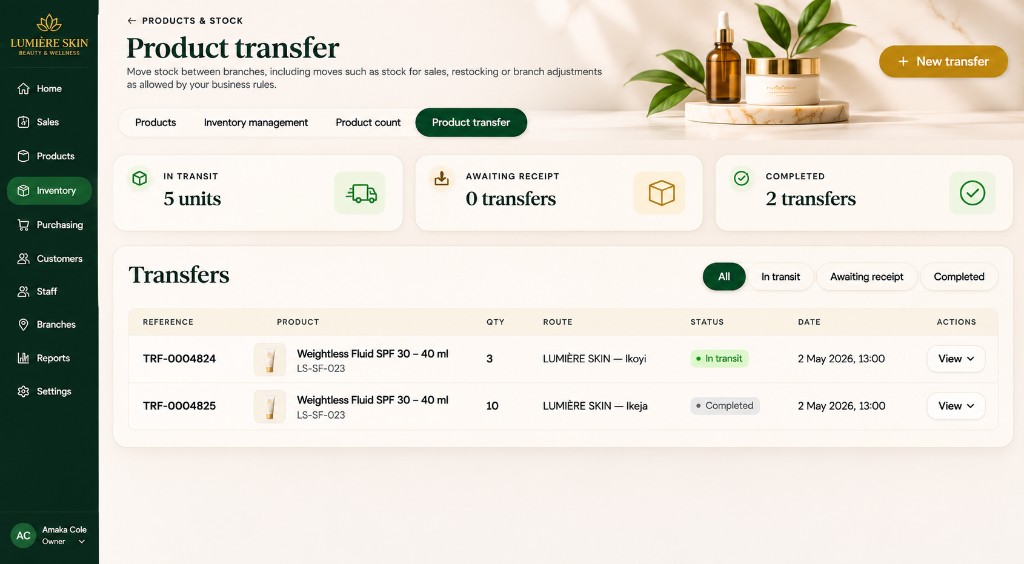
Transfer inventory from one location to another without breaking either branch’s on-hand figures.
Guide
Prerequisites
- At least two active branches
- Stock available at the source location
- Someone at the destination who can confirm arrival
Step 1: Create the transfer
Choose source and destination branches and the SKUs and quantities to move. Do not remove stock from one branch in a spreadsheet and add it to another by hand.
Step 2: Dispatch the goods
Pick the listed quantities, pack them, and note the transfer reference with the shipment so the receiving branch knows what to expect.
Step 3: Confirm arrival
At the destination, check quantities against the transfer and confirm receipt. Short shipments should be investigated, not silently absorbed.
Common mistakes
- Informal van moves with no transfer record
- Confirming arrival without checking quantities
- Transferring SKUs that were never received at the source
- Leaving transfers open for days with no follow-up
Summary
Create a transfer, dispatch the listed stock, and confirm arrival so both branches stay accurate.
Keep reading
Related reading
Multi-branch management · 15 Mar 2026
How to manage stock across multiple branches
Keep each location’s on-hand stock clear, move inventory with transfers, and avoid treating multi-branch stock as one shared pile.
Read articleInventory management · 10 Mar 2026
Common inventory mistakes retailers should avoid
The habits that quietly destroy stock accuracy — and what to do instead so reports stay trustworthy.
Read articleInventory management · 12 Mar 2026
Running a stock count
How to plan, count, and post variances so on-hand stock matches the shelf.
Read guidePurchasing and suppliers · 22 Mar 2026
Receiving a purchase into inventory
Record supplier deliveries against purchases so on-hand stock and costs stay trustworthy.
Read guide
Next step
Put the workflow into practice
Get started with Vendriz, or contact us if you want help matching the product to your shops.